
About
This project started small but captivated me for several days after, hence, it deserves its own post. Previously, my landing page featured a list of my interests, which felt a bit bland to me, given that we are talking about a landing page. That it shamelessly listed several private interests, such as ASMR, politics, or parenting, did not help either. Still inspired by my little MEGA acrostic animation, I first tried the same style on a list of my interests—yet failed miserably because it still looked too bare bones.
After spending half a night eliminating possible designs on my mind, I decided that an ASCII-based cellular automaton would capture my interests best. Apart from the written-out interests, the design itself was supposed to reveal where my interests lie and what visitors should expect of my website: algorithms, automation, production engineering, writing, coding, cryptology, primitive graphics, and a large dose of randomness. Basically, my only missing hobby is music, but there is no excuse for interrupting your own audio currently running in the background, and I wanted the Antomaton to auto-play right after landing.
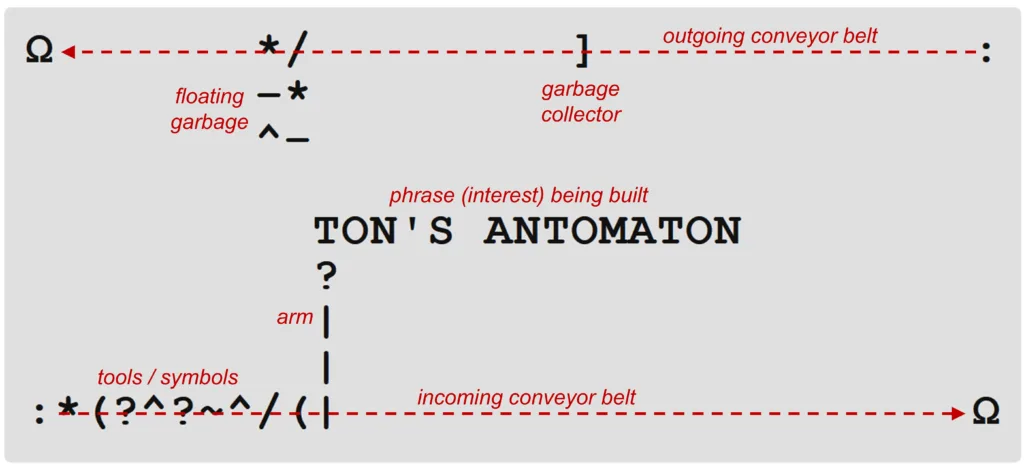
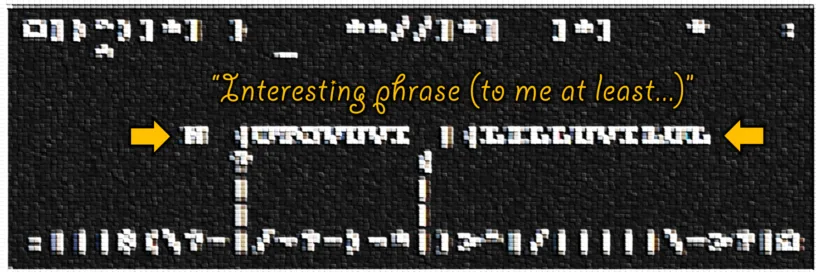
For those who are persecuted in their totalitarian home country, got to use the Tor browser, and disabled their JavaScript for security or economic reasons, I can at least describe what you would see otherwise: two conveyor belts, one bringing in symbols, the other removing them. Tiny arms, sometimes working in parallel, use these symbols to create phrases, my supposed interests. However, the arms have to construct the letters in several steps, using the rolled-in symbols to first form simple letters (e.g., L, T, U) and eventually complex letters (e.g., B, R, Ö). The symbols and letters become tools and workpieces, associated with production processes that differ in usability and costs, like a fully automated, yet never optimal word factory. For some reason, it is both satisfying and stressful to watch. The complexity, or what you may consider “randomness,” is based on three systems, which are detailed below.
System א: Interests
My interests are stored in a TXT file using a custom syntax of nested curly brackets. For example, the line {~, {red, hot} chili} {gum, peppers} would yield six different permutations: gum, red chili gum, hot chili gum, peppers, red chili peppers, hot chili peppers. Long lines are chosen more often, unless they start with an asterisk (*), which I use to avoid an overabundance of private, prominent, or monotonous phrases.
Since the automaton needs to work on different devices at pretty much any scale, I limited the maximum phrase length to 32 characters, which means that some permutations like “listening to finger-picked harmonies” or “conceptualizing experimental stories” (both 36 characters long) are always discarded. This reduces the total number of permutations by 80, which leaves about 2,400.
Eventually, I would like the interests or phrases to be created automatically. I would need a process running in the background that scrapes new posts or makes note of new favorite artists, bands, authors, or games. It hands out single unique phrases on demand, communicating directly with the automaton, so that your browser does not need to download the entire interests text file first. But for now, I create and edit the file manually.
System ב: Letter tree
The rules defining how to craft letters from symbols are stored in a second TXT file, containing lines of the shape L = | + – or A = H + ^. Currently, there are 54 rules, which allow for some umlauts and redundancy for cross-linkage. However, even single rule changes can affect the overall results very much, so I may optimize the tree further. Or in factory terms, the product is okay, although the blueprints and machining processes need further development to be more productive. Here is a visualization of the current letter tree, which helped me understand what I was even doing.
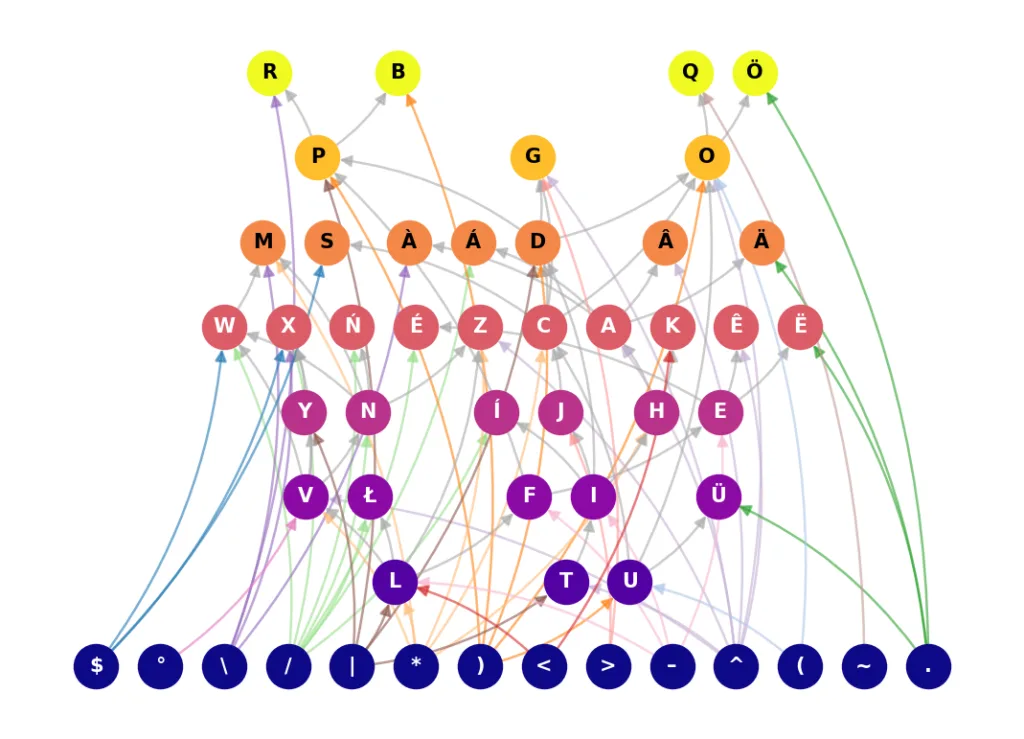
It should be noted that the crafting symbols, $°\/|*)<>-^(~., are only needed to construct letters. To deconstruct them, the ? tool is used, breaking down letters and knocking off symbols in reverse to the letter rules, until merely spaces are left.
System ג: Automaton
What you actually see on screen, the arms and conveyor belts. While the outgoing belt moves only when there is trash to be carried away, the incoming belt can only move while all arms are retracted. Most importantly, every time a phrase is completed, the incoming belt chooses one of four different conveyor modes:
- Chaos mode: the required symbols are mixed with random symbols and about 33% of
?chars. All symbols are one-shots, and they often get stolen by other letters than the designated ones. It behaves like ammunition on a belt being spent. Slowest algorithm, as parallelization happens only accidentally. - Batch mode: the required symbols are rolled in on a tray. Once the tray is in position the arms start moving the symbols, which are also one-shots. Batch mode is inspired by additive manufacturing, particularly powder bed fusion processes. Highly parallelized production but inefficient final touches.
- Typewriter mode: Less random than chaos mode and serially faster, only all symbols are multi-shots, meaning one arm can do several operations without the incoming belt ever moving. This increases single arm speed but often obstructs parallelization as the ingoing belt is not moving forward to fill up. Imagine a sewing machine where the needle moves independently from the hand that feeds the fabric.
- Revolver mode: Similar to typewriter mode, only the incoming belt has to move one step per arm action. The symbols are multi-shot but can only be used on consecutive letters of the phrase, not on the same letter twice. Seems like a decent all-rounder in terms of serialization vs. parallelization.
To summarize my findings, all four algorithms are somewhat productive at first but become increasingly more costly toward the final touches. This of course resembles reality. Both belts and the text phrase itself behave decoupled, and the conveyor modes are chosen at random. Symbols that are already on the incoming belt may greatly affect how the next conveyor mode will act (non-deterministically, for the most part). Or in other words, each conveyor mode is improved by the variety of modes. [Competition breeds excellence?]
In case you wondered why I termed the belts “incoming/outgoing” instead of simply “top/bottom” or “upper/lower,” just click the automaton a couple of times and it will make sense. In fact, this single interactive element is more of a joke than a qualification for a browser-based mini game; it is supposed to let the visitor know that this machine has a mind of its own, that not even this single button is reliable—but an ass-kick to the face. Because interacting with the automaton has a 50/50 chance for either:
- Swapping the two conveyor belts and their directions (as well as reversing gravity)
- Toggling between dark and light mode (or “VANTA dark” and “muddy gray” mode if your device sports a built-in dark mode)
The entire JavaScript code is about 900 lines long and was created with Google Gemini 3.1 Pro, quite the useful model so far, if only the rate limits were a little higher! This time I let the AI interview me before doing major changes to the code, just to leave few things up to chance. No need to mention that the conveyor modes initially suggested by the AI were pure keech, whereas it excelled at hard-coding my own ideas. Glad to know AI still requires human architects.
Trivia
I briefly considered letting the visitor switch between UPPERCASE and lowercase letters because both have their own appeal; while UPPERCASE makes more sense for constructing letters from bars and arcs, lowercase is generally faster to read. Nonetheless, I decided against the distinction because it would have required two different letter trees. I was not even sure the one would work.
Chaos mode was the first conveyor mode I created. Ultimately, I wanted to develop more sophisticated algorithms based on machine learning that make the conveyor belts more adaptive and the phrase crafting faster. But at this point, I find the automaton’s inefficiency somewhat endearing, so total optimization may not be the main goal in this case.
Once per phrase it is decided how many arms to use in parallel, either 2, 3, 4, 5, 10, or all arms with a higher chance, as the number of arms greatly affects the overall speed and I do not want you to get bored.
With a 50/50 chance, chaos or batch mode use strengthened ǁ arms instead of | arms. For now, the upgrade is purely aesthetic.
Waiting at the end of the Greek alphabet, the letter Ω (uppercase omega) signifies the end of things. Therefore, it became the recycling bin. In hindsight, I might also have used ω (lowercase omega, which Mr. Smith, my pre-calculus teacher in Oregon, rightfully named “butt double-U”). On the other hand, the symbol : (colon) is used for sequences/array indices in Python and MATLAB. Thus, it is the ideal symbol to squeeze other symbols through and defecate them onto the conveyor belts.
I have no idea how Antomaton may look on your device as it always uses the monospace font most readily available. From what I have seen so far, symbol depictions vary greatly between different fonts. This is somewhat intentional, as I do not think it will break the animation but instead highlight its non-deterministic character.

Leave a Reply